
About our web shop
To load your card via the web shop, you must already have a travel card. We recommend that you create and activate a user account in the webshop before making a purchase. This will provide you with a better and more secure purchasing experience.
In our webshop, you can buy several of our tickets and also top up your travel credit. You can add a minimum of 50 SEK per transaction, and your travel card can hold up to 2,000 SEK.
Tickets you can buy in our web shop
| Geographical validity | Validity period | Pris group |
|---|---|---|
| Örebro county | 30 days | Adult 20+ |
| Young person 7-19 år | ||
| 30 days off-peak | Adult 20+ | |
| Young person 7-19 år | ||
| One or two districts | 30 days | Adult 20+ |
| Young person 7-19 år | ||
| 30 days off-peak | Adult 20+ | |
| Young person 7-19 år | ||
| City Örebro or Lindesberg | 30 days | Adult 20+ |
| Young person 7-19 år | ||
| 30 days off-peak | Adult 20+ | |
| Young person 7-19 år | ||
| Municipality Karlskoga | 30 days | Adult 20+ |
| Young person 7-19 år | ||
| 30 days off-peak | Adult 20+ | |
| Young person 7-19 år | ||
| 1-2 zones | 30 days | Adult 20+ |
| Young person 7-19 år | ||
| Örebro + Värmland | 30 days | Adult 20+ |
| Young person 7-19 år |
Pay for a ticket
To pay, you need a debit or credit card with VISA or MasterCard/Maestro. The payment is deducted from your card account or credit account in the same way as when you use your card in a store. Our payment gateway is PCI-licensed and complies with the confidentiality and security standards required by banks and card issuers for this certification.
 Borrowing costs money!
If you choose to make purchases in our webshop using a credit card, it may pose a risk to you if you are unable to pay off your credit or invoice later.
If you fail to repay your debt on time, you risk receiving a payment default, which could make it difficult to rent a home, sign contracts for services, or obtain new loans. For support, contact the budget and debt counselling service in your municipality. Contact details can be found on the Swedish Consumer Agency's (Konsumentverket) website.
Lost Ticket Guarantee
Once you have created the user account, you can choose to register your travel card. By registering your travel card in the web shop, you get a lost guarantee. This means that you get a new travel card at no extra cost if you lose it.
The new travel card will be loaded with the tickets and travel cash you had on your old travel card.
View your balance and block your card
In the web shop, you can view the balance on your travel card and block your card if needed. To view your balance, log in to the web shop. Your current balance is shown on the first page after you sign in.
Load your travel card in good time
When you buy season tickets or load your travel credit in the web shop, it takes a few hours before your travel card is updated with the purchase. We therefore recommend that you make purchases and charges in the web shop before 6.00 pm the day before you travel.
It takes about a day from the time you load your travel card on board the bus until the charged amount with travel credit is visible in the total balance in the web shop. In the meantime, you can see your latest purchase, along with other purchases under the purchase history or card history.
Forgotten username or password
Forgotten the password for your web shop account? Click on the link, enter the email address you used to register the account, and a new password will be sent to that email address.
Scan Your Journey
You need to scan your ticket every time you board a bus and before you get on a train.
-
Scan on board a city bus in Örebro or Citylinjen
On our city buses in Örebro, you can scan your Travel card either with the driver or at the ticket reader inside the bus. If you're travelling with Citylinjen, you can board through any door and scan your Travel card there.
If you want to scan your ticket with the driver, hold your Travel card up to the reader located on the top of the ticket machine. Hold it there until you see a message on the ticket reader indicating the ticket is approved, and hear a beep confirming the ticket. You don't need to inform the driver or press anything before scanning the ticket.
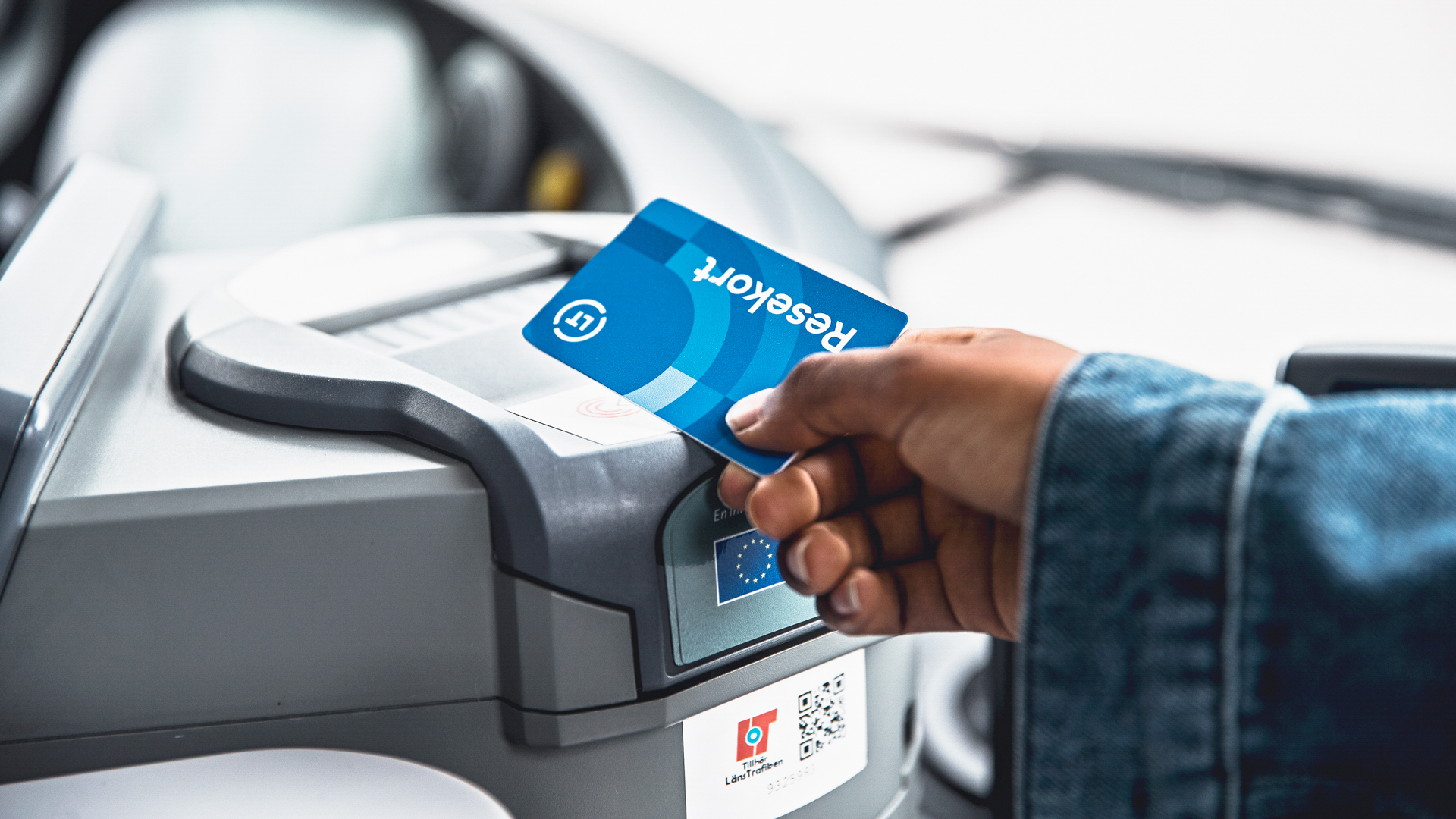
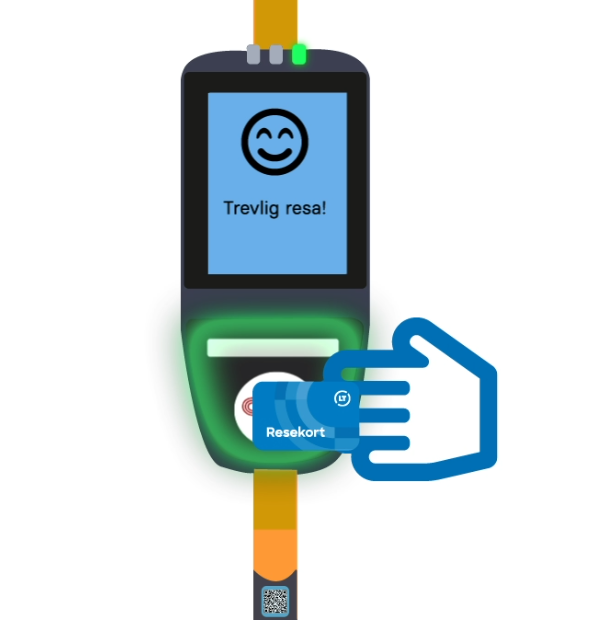
If you want to scan your already purchased ticket at the ticket reader inside the bus, hold your Travel card up to the reader on the lower part of the ticket reader. You don't need to press anything before scanning the ticket. Hold the card against the reader until you see a smiling face on the screen, indicating that the scan has been approved.
-
Scan on board the city bus in Karlskoga or Lindesberg
You can scan your travel card with the driver. Hold your travel card up to the reader located on the top of the ticket machine. Hold it there until you see a message on the ticket reader indicating the ticket is approved, and hear a beep confirming the ticket. You don't need to inform the driver or press anything before scanning the ticket.
-
Scan on board a regional- or express bus
You scan your ticket with the driver by holding your card against the reader located on the top of the ticket machine. Hold it there until you see a message on the reader indicating that the ticket is approved. You will also hear a beep when the ticket is accepted. You do not need to notify the driver or press anything before scanning the ticket.
-
Scan before your train journey
If you already have a ticket, you need to scan it at one of the yellow ticket machines on the platform. Hold your travel card against the card reader under the display. Keep it there until you see a confirmation message on the screen. You should do this before boarding the train.
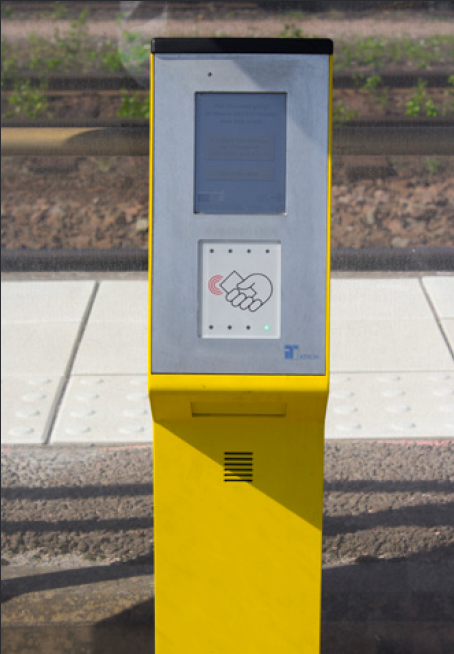
Once onboard, you will either need to have your travel card scanned by the on board staff or show your travel card along with the corresponding receipt. The on board staff will ask you to display your ticket.
-
Scan on board Närtrafik
When travelling with Närtrafik, you should show your ticket, along with the corresponding receipt, to the driver who picks you up.
-
Broken ticket machine
If the ticket machine onboard the bus is broken, try another machine or show your ticket to the driver. If you are traveling with a travel card, please bring the purchase receipt and show it to the driver.
If a ticket machine at the platform is broken, you can use one of the others available at the station.
-
Across the boarder
If your ticket is loaded onto a travel card, show the card together with your receipt.
Terms of purchase and terms of use for the web shop
By using our web shop, you agree to our terms of purchase and terms of use for the web shop. Please read the terms and conditions before you start using the web shop.